Turtle
Turtle graphics is a classic way of drawing with a program: a turtle sits on a plane, walks forward, turns, and leaves a line behind as long as its pen is down. This example uses a turtle to draw three famous fractal curves, a fern, the C-curve, and the dragon curve, with three short recursive procedures. Each curve is drawn onto its own page of a PDF file. The program is based on sample code for LILA, a historic Lisp interpreter for Mac OS 8; the original code dates from 1994.
Program: Turtle.scm, in the Examples folder of LispKit
Libraries: (lispkit base), (lispkit draw), (lispkit draw turtle)
Techniques: recursion, turtle graphics, parameter objects, PDF output
What the program draws
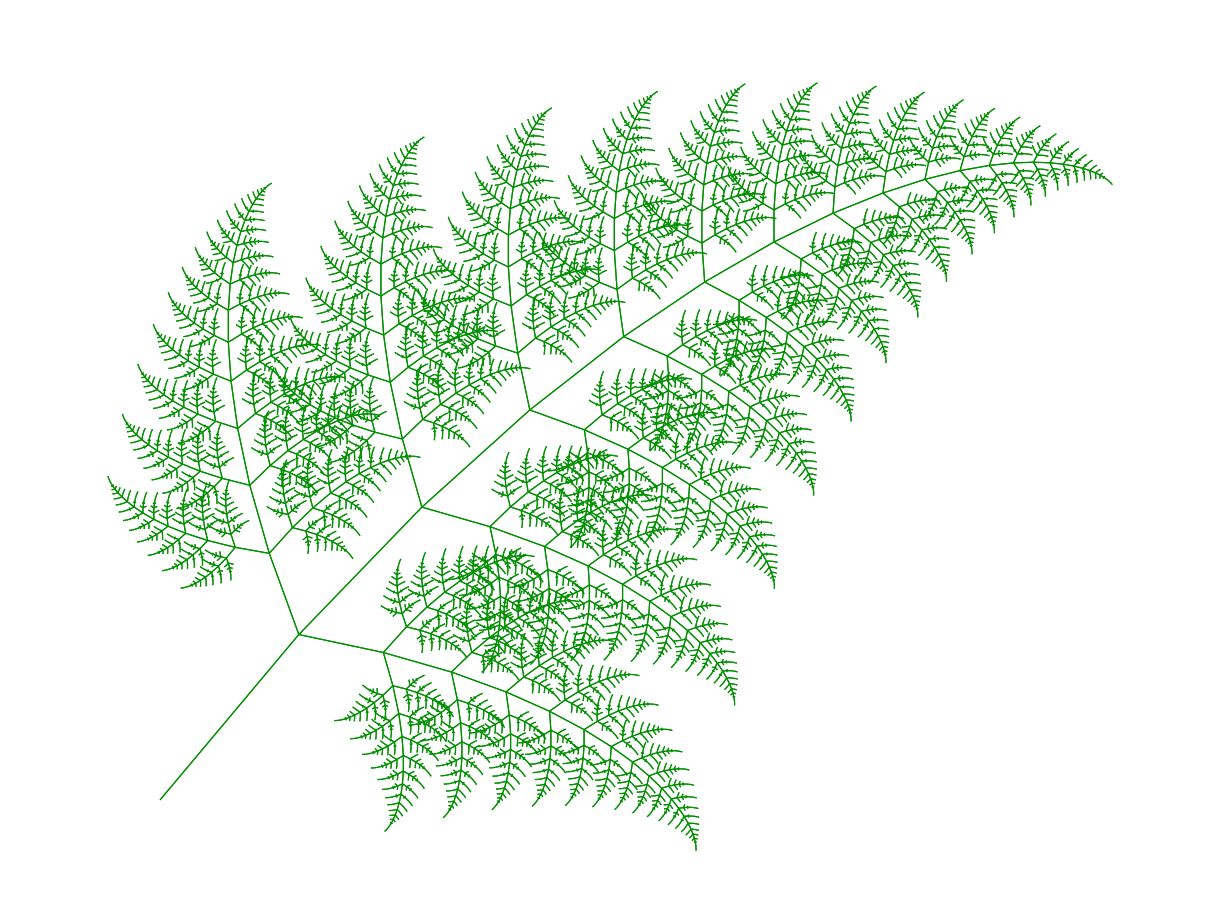
The fern
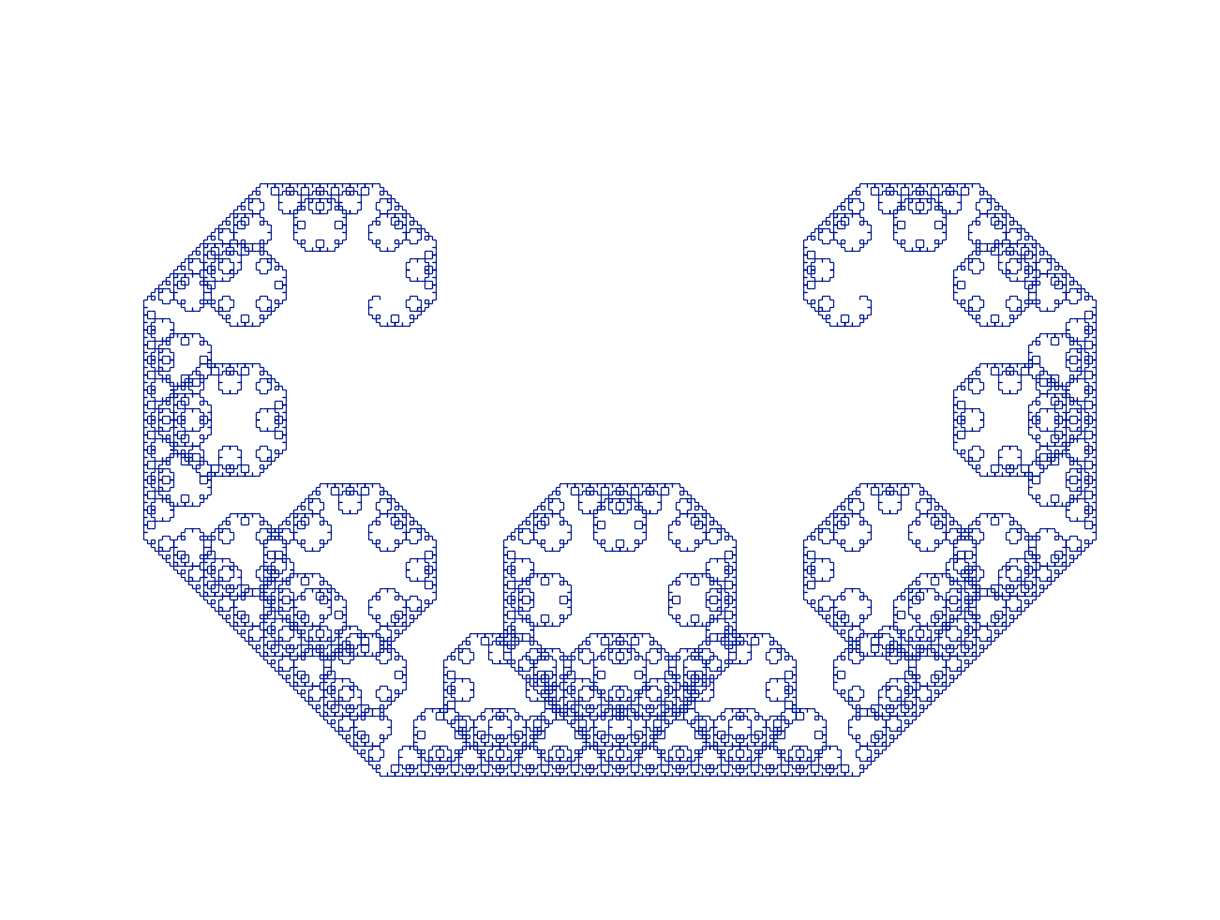
The C-curve
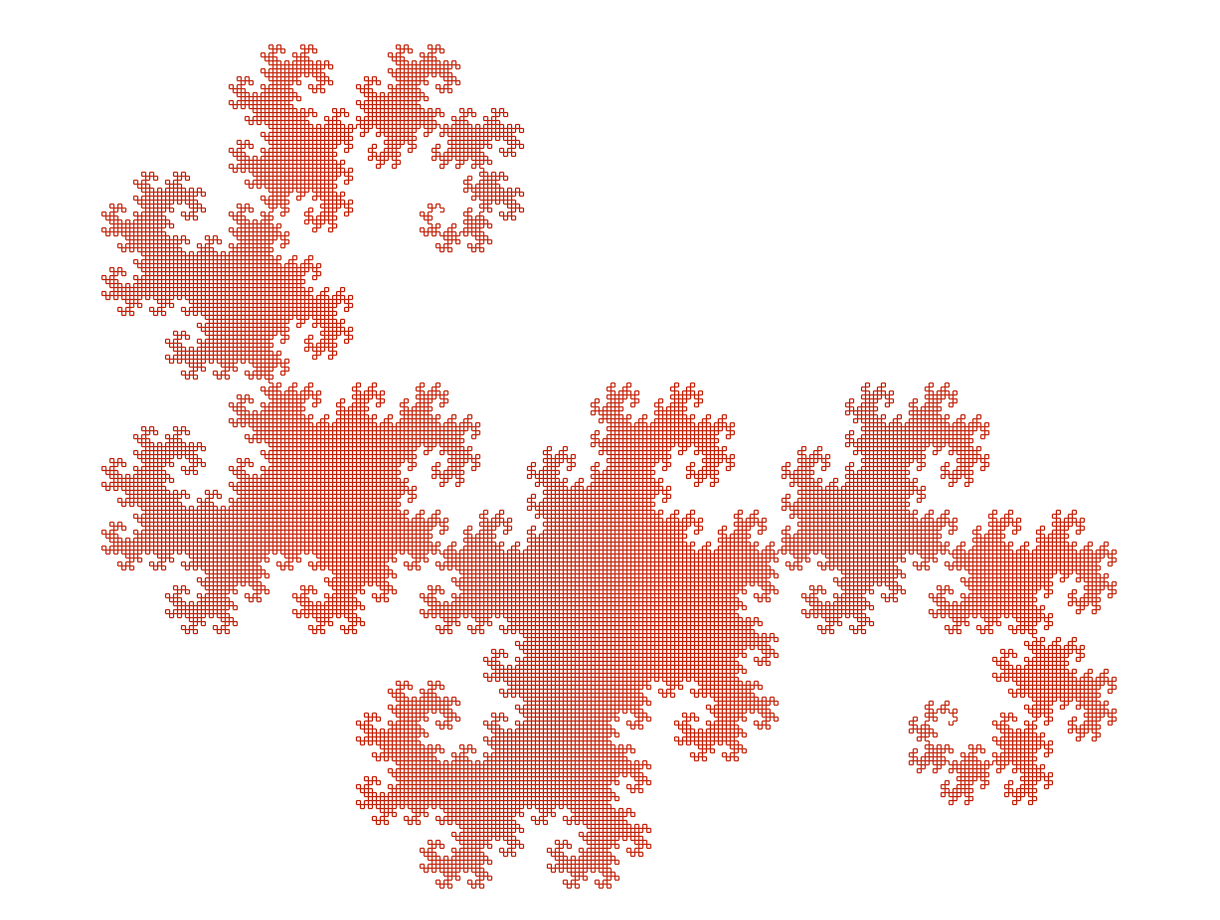
The dragon curve
The curves look intricate, but they are made of nothing but straight lines. The number of times procedure forward is called to draw a page shows how much detail the recursion produces:
| Curve | Call | Calls of forward |
|---|---|---|
| Fern | (fern 300.0 2.0) | 47,144 |
| C-curve | (ccurve 120.0 0 1.0) | 16,384 |
| Dragon curve | (dragon 180.0 90 1.0) | 32,768 |
Running the program
Build LispKit from a clone of the GitHub repository and load the program into the LispKit REPL:
swift build -c release -Xswiftc "-D" -Xswiftc "SPM"
.build/release/LispKitRepl -r Sources/LispKit/Resources -d LispKit \
    -p Sources/LispKit/Resources/Examples/Turtle.scm
The option -p runs the program as the prelude of the REPL. The REPL stays open afterwards, and the definitions of the program are available at the prompt. Without -p, LispKitRepl runs the program and ends. Leave the REPL with (exit).
The program only defines procedures, so nothing happens yet. At the prompt, call save-graphics with the name of the PDF file to create:
(save-graphics "turtle-demo.pdf")
Drawing fern page
Drawing c-curve page
Drawing dragon page
Saving drawings in PDF file turtle-demo.pdf
A relative file name refers to the directory the REPL was started in; (file-path "turtle-demo.pdf") returns the absolute path. The PDF file has three pages, one per curve, each 610 × 460 points large.
Turtle graphics in a nutshell
A turtle has a position, a heading, a pen that is either up or down, a pen color, and a line width. Library (lispkit draw turtle) provides procedures to create turtles and to move them around. The program uses the following ones:
| Procedure | Effect |
|---|---|
(make-turtle x y scale) | Creates a turtle with an empty drawing. The home of the turtle, its position (0, 0), is placed at (x, y) in the drawing, and everything the turtle draws is magnified by scale. |
(move x y) | Puts the turtle at (x, y), measured from its home, without drawing a line. |
(heading angle) | Sets the direction of the turtle. Angles are in degrees; 0 points to the right. |
(turn angle) | Turns the turtle by angle degrees. Positive angles turn clockwise as seen on the page. |
(forward distance) | Moves the turtle and draws a line if the pen is down. A negative distance moves the turtle backwards. |
(pen-color color), (pen-size width) | Set the color and the width of the lines. |
(turtle-drawing turtle) | Returns the drawing the turtle has recorded. |
current-turtle | A parameter object holding the turtle that is used by all the other procedures. |
The library has more, e.g. backward, left, right, pen-up, pen-down, home, and arc, which the program does not need.
As a first example, a turtle that repeats go forward by 100, turn by 144 degrees five times draws a five-pointed star. The turns add up to 720 degrees, two full rotations, so the turtle ends up where it started, facing the same direction:
(define star
  (parameterize ((current-turtle (make-turtle 20 60 1.0)))
    (pen-color (color 0.7 0.0 0.0))
    (pen-size 1.5)
    (do ((i 0 (+ i 1)))
        ((= i 5))
      (forward 100)
      (turn 144))
    (turtle-drawing (current-turtle))))

(save-drawing "star.pdf" star (size 140 140))

The star drawn by five times forward and turn
Libraries
| Library | Used for |
|---|---|
(lispkit base) | The language itself: define, if, cond, begin, parameterize, arithmetic, and the output procedures display and newline. |
(lispkit draw) | Colors (color), page sizes (size), and save-drawings, which writes drawings into a PDF file. The turtle records what it draws as a drawing of this library. |
(lispkit draw turtle) | The turtle: make-turtle, current-turtle, move, heading, turn, forward, pen-color, pen-size, and turtle-drawing. |
The turtle library is small: fewer than 100 lines of Scheme code in Sources/LispKit/Resources/Libraries/lispkit/draw/turtle.sld. A turtle is a record with a drawing, a position, a heading, and a pen flag. forward computes the new position from the heading with cos and sin and, if the pen is down, calls draw-line on the drawing of the turtle. A turtle never draws onto a screen. It only records lines into a drawing, a data structure that can later be saved, shown, or combined with other drawings.
Design
How a page gets drawn
The program is organized in three layers. save-graphics collects one page for each curve. Each page procedure prepares a fresh turtle and starts the recursive procedure of its curve. The recursive procedures contain the actual geometry and talk to the turtle only via forward, turn, and heading:
The main ideas
One recursive procedure per curve. A fractal curve is defined by a rule that replaces a segment with a number of smaller segments. The rule applies to the smaller segments again, until they are shorter than a threshold. Each procedure has such a threshold, min, as its last parameter. A smaller min leads to more recursion and a more detailed curve.
The heading is managed locally. The turns in each recursive step of the fern and the dragon curve add up to zero, so a recursive call returns with the heading it was called with; the fern even walks back to its starting position. The C-curve sets the heading explicitly for each segment. This way, recursive calls can follow each other without any bookkeeping, and the end of one piece is the start of the next.
Turtles are passed implicitly. The page procedures bind the parameter object current-turtle with parameterize. All procedures called in its body use that turtle, which is why the curve procedures do not need a turtle argument.
Pages are plain data. A page is a list of a drawing and a size. save-drawings writes a list of pages into a PDF file, one page after the other.
Walkthrough
The following sections go through the program from top to bottom. Together, the code blocks make up the complete source of Turtle.scm.
Header and imports
Description, credits, and license
;;; Turtle graphics
;;;
;;; This is a demo of library (lispkit draw turtle). Three different
;;; fractal curves are drawn and saved as individual pages in a PDF
;;; document. These examples are based on the sample code for LILA,
;;; a historic Lisp interpreter for Mac OS 8.
;;; (see http://zenger.org/lila/).
;;;
;;; Usage: (save-graphics "turtle-demo.pdf")
;;;
;;; Author: Matthias Zenger
;;; Copyright © 2018 Matthias Zenger. All rights reserved.
;;; Original copyright © 1994-03-06, Matthias Zenger.
;;;
;;; Licensed under the Apache License, Version 2.0 (the "License"); you may
;;; not use this file except in compliance with the License. You may obtain
;;; a copy of the License at
;;;
;;;   http://www.apache.org/licenses/LICENSE-2.0
;;;
;;; Unless required by applicable law or agreed to in writing, software
;;; distributed under the License is distributed on an "AS IS" BASIS,
;;; WITHOUT WARRANTIES OR CONDITIONS OF ANY KIND, either express or implied.
;;; See the License for the specific language governing permissions and
;;; limitations under the License.
(import (lispkit base)
        (lispkit draw)
        (lispkit draw turtle))
The fern
(define (fern size min)
   (if (>= size min)
       (begin
         (forward (* 0.18 size))
         (turn 4)
         (fern (* 0.82 size) min)
         (turn 58)
         (fern (* 0.40 size) min)
         (turn -122)
         (fern (* 0.40 size) min)
         (turn 60)
         (forward (* -0.18 size)))))
fern draws a frond with a stem of length size. It stops when size has become smaller than min. Otherwise, it works in these steps:
- Walk forward by 18% of
size. This is a piece of the stem. - Turn by 4 degrees, so that the stem curls slightly, and draw the rest of the stem: a smaller fern with 82% of
size. - Turn by 58 degrees and draw a branch to the right of the stem, a fern with 40% of
size. - Turn by -122 degrees, which points 64 degrees to the left of the stem, and draw a second branch, another fern with 40% of
size. - Turn by 60 degrees: 4 + 58 - 122 + 60 = 0, so the turtle has the heading it started with. Walk backwards by the length of the first step. The negative distance of
forwarddraws the line a second time, which is why the fern consists of twice as many calls offorwardas it has stem pieces. The turtle is back at its starting point.
(define (fern-page)
  (display "Drawing fern page")
  (newline)
  (parameterize ((current-turtle (make-turtle 200 200 2.0)))
    (pen-color (color 0.0 0.5 0.0))
    (pen-size 0.3)
    (move -60 100)
    (heading -50)
    (fern 300.0 2.0)
    (list (turtle-drawing (current-turtle)) (size 610 460))))
parameterize makes a new turtle the current turtle while the body is evaluated. The turtle is created with its home at (200, 200) of the drawing and a scale of 2.0. The pen is set to a dark green and a thin line. (move -60 100) places the turtle to the left of and below its home. The y axis of a drawing points downwards, so these coordinates end up at (80, 400) on a page of 610 × 460 points, near its bottom left corner. (heading -50) points the turtle 50 degrees counterclockwise from the right, i.e. up and to the right, and (fern 300.0 2.0) draws the fern.
The result of the page procedure is the format save-drawings expects for a page: a list with the drawing of the turtle and the size of the page.
The C-curve
(define (ccurve len angle min)
  (cond ((< len min)
          (heading angle)
          (forward len))
        (else
          (ccurve (* len 0.7071) (+ angle 45) min)
          (ccurve (* len 0.7071) (- angle 45) min))))
The C-curve replaces a segment of length len pointing in direction angle with two segments that form a right angle. They are shorter by a factor of 0.7071, about 1/√2, and point in directions angle + 45 and angle - 45, so that the original segment is the hypotenuse of a right-angled triangle. This rule is applied again to each of the two segments. Segments shorter than min are drawn: the procedure sets the heading and walks forward. Since the heading is set explicitly at every leaf, ccurve does not need to turn the turtle back.
(define (ccurve-page)
  (display "Drawing c-curve page")
  (newline)
  (parameterize ((current-turtle (make-turtle 200 200 2.0)))
    (pen-color (color 0.0 0.0 0.5))
    (pen-size 0.3)
    (move -5 -25)
    (ccurve 120.0 0 1.0)
    (list (turtle-drawing (current-turtle)) (size 610 460))))
The page has the same shape as the fern page, only with a blue pen and different coordinates. The curve starts at the position given by move; (ccurve 120.0 0 1.0) starts with a segment of length 120 pointing to the right. The length of the segments shrinks from 120 to 0.94 in 14 steps, which is below the threshold min of 1.0. So the recursion is 14 levels deep and the curve consists of 214 = 16,384 line segments.
The dragon curve
(define (dragon len angle min)
  (define ang2 (- 90 angle))
  (define (sdragon size positive)
    (cond ((< size min)
            (forward size))
          (positive
            (turn angle)
            (sdragon (* size 0.7071) #t)
            (turn -90)
            (sdragon (* size 0.7071) #f)
            (turn ang2))
          (else
            (turn (- ang2))
            (sdragon (* size 0.7071) #t)
            (turn 90)
            (sdragon (* size 0.7071) #f)
            (turn (- angle)))))
  (heading angle)
  (sdragon len #t))
The dragon curve works like the C-curve: every segment is replaced by two segments at a right angle, which are shorter by the factor 0.7071. The difference is that the two halves are not treated the same. Local procedure sdragon has a flag positive. The corner between the two halves turns left in a positive dragon and right in a negative one, and the first half is always positive while the second half is always negative. This alternation produces the characteristic folded shape.
dragon defines ang2 as 90 - angle and sdragon as local procedures. sdragon uses min, angle, and ang2 of the enclosing procedure. As in the fern, the turns of each case add up to zero, so sdragon returns the turtle to the heading it had when it was called. Only segments shorter than min are drawn. With the arguments used by the page, angle is 90 and ang2 is 0, so the last turn of each case has no effect. The drawing starts with (heading angle), i.e. with the turtle pointing down.
(define (dragon-page)
  (display "Drawing dragon page")
  (newline)
  (parameterize ((current-turtle (make-turtle 200 200 2.0)))
    (pen-color (color 0.7 0.0 0.0))
    (pen-size 0.3)
    (move 10 -47)
    (dragon 180.0 90 1.0)
    (list (turtle-drawing (current-turtle)) (size 610 460))))
The length of the segments shrinks from 180 to 0.99 in 15 steps. So the recursion is 15 levels deep and the curve consists of 215 = 32,768 line segments.
Saving the pages
(define (save-graphics filename)
  (let ((pages (list (fern-page) (ccurve-page) (dragon-page))))
    (display "Saving drawings in PDF file ")
    (display filename)
    (newline)
    (save-drawings filename pages "Demo of library (lispkit draw turtle)")))
save-graphics creates the three pages, prints a message, and writes all pages into one PDF file. The third argument of save-drawings is the title of the PDF document. Since the page procedures are independent of each other, it is easy to draw one curve only, e.g. (save-drawings "fern.pdf" (list (fern-page)) "Fern").
Variations
More or less detail. The last argument of each curve procedure decides how deep the recursion goes. Calling ccurve with four different values of min and moving the turtle between the calls draws the same curve with 2, 16, 128, and 1,024 line segments:
(define refinement
  (parameterize ((current-turtle (make-turtle 70 60 1.0)))
    (pen-color (color 0.0 0.0 0.5))
    (pen-size 0.6)
    (for-each (lambda (i min)
                (move (* i 270) 0)
                (ccurve 120.0 0 min))
              '(0 1 2 3)
              '(100.0 35.0 12.0 4.5))
    (turtle-drawing (current-turtle))))

(save-drawing "ccurve-refinement.pdf" refinement (size 1090 210))

The C-curve with 2, 16, 128, and 1,024 line segments
More ideas. Draw the curves in other colors or with different line widths. Change the angles and the factors of the fern, e.g. the curl of 4 degrees, to get different plants. Draw several fronds into one drawing, using move and heading between the calls, or use pen-up and pen-down to jump to a new place without drawing a line. Replace turn by left and right, or draw circles and arcs with arc.
Further reading
(lispkit draw turtle): reference documentation of the turtle library(lispkit draw): drawings, colors, and PDF output(lisppad turtle): a turtle with a graphics pane for interactive use in LispPad. According to its documentation, its angles are measured in radians.- LILA: the Lisp interpreter whose sample code this program is based on