> For the complete documentation index, see [llms.txt](https://www.lisppad.app/llms.txt). Markdown versions of documentation pages are available by appending `.md` to page URLs; this page is available as [Markdown](https://www.lisppad.app/libraries/lisppad/applet.md).
# (lisppad applet)
Library `(lisppad applet)` provides an API for Scheme programs that are invoked via the macOS and iOS Shortcuts app. An applet is a LispPad program that can be executed by the "Run Program" app intent within the iOS Shortcuts app or other apps that support Apple's *App Intents* framework. The library enables applets to read their input arguments, construct result values to return to the caller, manage applet attachments, and display simple interactive dialogs. With the API of `(lisppad applet)`, it is possible to write Scheme programs that run both in the LispPad app as well as in Shortcuts workflows.
## Program model
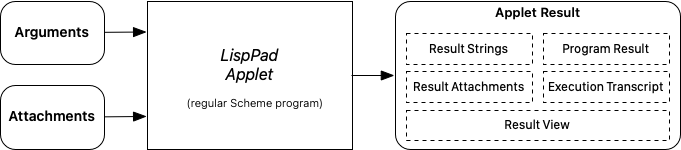
Applets are programs that receive two types of inputs, *arguments* and *attachments*, via procedures `applet-arguments` and `applet-attachments`. *arguments* are of type string, *attachments* are of type `applet-attachment`. `applet-attachment` objects represent binary data. They are either persistet and have a file URL, or they are transient. `applet-attachment` objects also have a filename and an optional Uniform Type Identifier (UTI) identifying the type of the binary data.
An applet returns an object of type `applet-result` which has the following components: result strings (representing textual results), result attachments, i.e. `applet-attachment` objects (representing binary data), a string representation of the value the last statement of the program evaluates to, a transcript collecting all output to standard out, and a "view" consisting of a sequence of strings and images which are displayed on demand, e.g. after an applet ran as part of a shortcut on iOS or macOS. Applets typically construct an `applet-result` object explicitly and return it as the result of the program.
## Using applets in Shortcuts
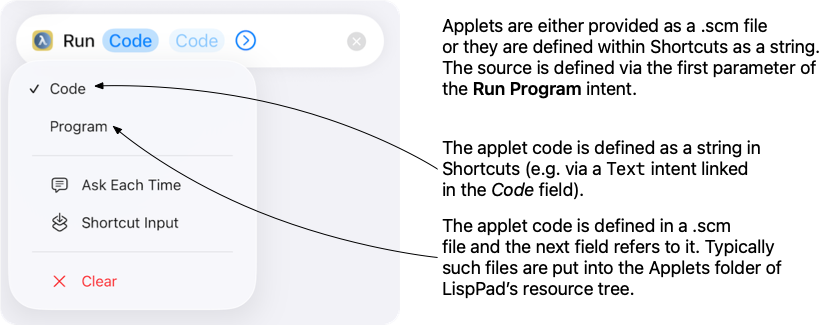
LispPad makes the following 3 intents available in the Shortcuts app:
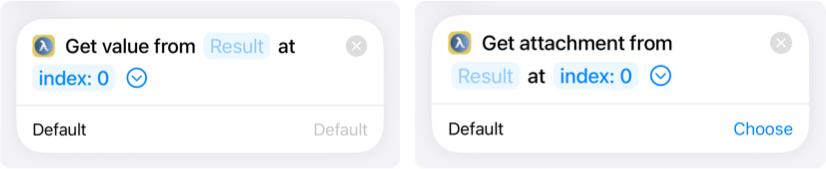
`Run Program` is used to execute an applet within Shortcuts. `Get Result Attachment` and `Get Result Value` are used to extract individual attachments and result strings from an applet result object. Other components can be accessed directly as "magic variables" from the applet result object.
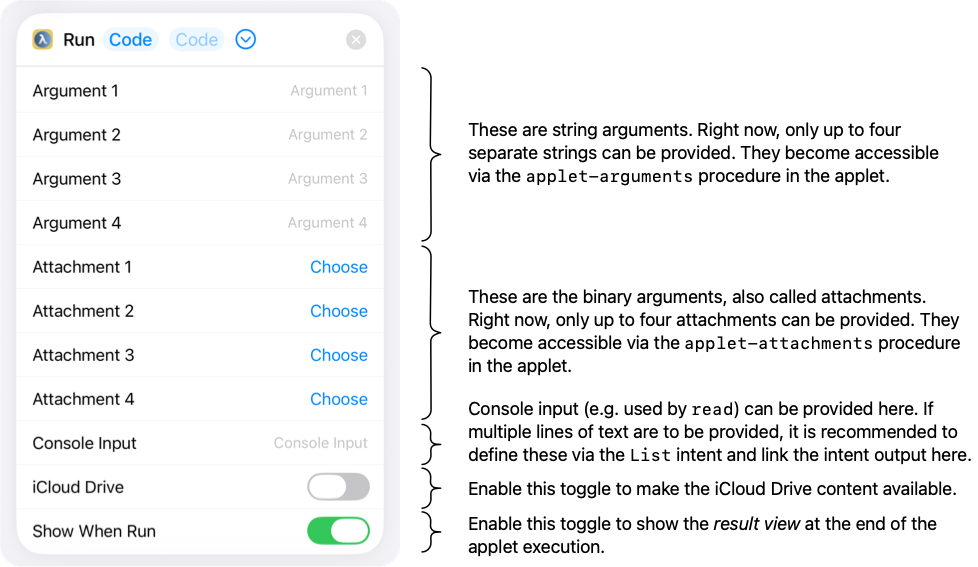
All other parameters, especially the ones made available as arguments via `applet-arguments` and as attachements via `applet-attachments` can be configured in the optional section of the `Run Program` intent:
The remaining two intents, `Get Result Attachment` and `Get Result Value`, take an applet result as their first parameter followed by an index that identifies the concrete attachment or string to return.
## Execution context
**(running-as-applet?)**
Returns `#t` if the program is currently executing as an applet using the `Run Program` intent within Shortcuts. Returns `#f` if the program is running interactively in LispPad.
## Applet input
Applets receive arguments and attachments from the caller. Arguments are strings, attachments encapsulate binary data represented as `applet-attachment` objects. Both types of input can be accessed either directly via an index, or as a whole in form of a list.
**(applet-argument *****index*****)** \
**(applet-argument *****index default*****)**\
**(applet-argument *****index default force-orig?*****)**
Returns the argument string at *index*. If there is no argument at this index, string *default* is returned if provided and not set to `#f`, otherwise `#f` is returned. *force-orig?* determines if the argument resolution includes a potential input override (default) or if the argument is required to come from the caller.
**(applet-arguments)** \
**(applet-arguments *****force-orig?*****)**\
**(applet-arguments *****defaults*****)**\
**(applet-arguments *****force-orig? defaults*****)**\
**(applet-arguments \_defaults force-orig? \_)**
Returns a list of the string arguments passed to the applet. If *defaults* is provided, it is a list of default values. For each position where no string argument was supplied (or the supplied string is empty), the corresponding element from *defaults* is used instead. If *defaults* is provided and has fewer elements than the number of arguments, only the first `(length defaults)` arguments are returned.
If *force-orig?* is `#f` (or not provided) and an argument override has been set via `applet-input-override!`, the override values are used instead of the actual applet arguments. Setting *force-orig?* to `#t` forces the procedure to always return the actual applet arguments, ignoring any override. Elements for which no string was provided and no default was given are returned as `#f`.
**(applet-attachment *****index*****)** \
**(applet-attachment *****index default*****)**\
**(applet-attachment *****index default force-orig?*****)**
Returns the attachment at *index*. If there is no attachment at this index, `applet-attachment` object *default* is returned if provided and not set to `#f`, otherwise `#f` is returned. *force-orig?* determines if the attachment resolution includes a potential input override (default) or if the attachment is required to come from the caller. Attachments are always represented as `applet-attachment` objects.
**(applet-attachments)** \
**(applet-attachments *****force-orig?*****)**\
**(applet-attachments *****defaults*****)**\
**(applet-attachments *****force-orig? defaults*****)**\
**(applet-attachments *****defaults force-orig?*****)**
Returns a list of the attachments passed to the applet as `applet-attachment` objects. Behaves analogously to `applet-arguments`: *defaults* provides fallback values for missing attachments, and *force-orig?* controls whether an active argument override is applied. Elements for which no attachment was provided and no default was given are returned as `#f`.
**(applet-input-override! *****result*****)**
Installs *result*, an `applet-result` object, as an override for the applet's input arguments. Subsequent calls to `applet-arguments` and `applet-attachments` (without *force-orig?* set to `#t`) will return the arguments and attachments stored in *result* instead of the actual applet arguments. If *result* is `#f`, any existing override is removed. Returns the previous override, or `#f` if there was none. This procedure is useful for testing applets interactively in the LispPad interpreter by simulating applet input.
## Applet results
An `applet-result` object is a mutable object that collects string values and attachments to be returned to the caller when the applet finishes. The `make-applet-result` procedure creates a new result and the various `applet-result-*` procedures build it up incrementally.
**(make-applet-result)** \
**(make-applet-result *****obj ...*****)**
Creates and returns a new `applet-result` object. Each *obj* argument is added to the result immediately using the same rules as `applet-result-append!`. String arguments are added to the result's string list whereas images, PDF documents, styled text, bytevectors, and archives are added to the result's attachment list. `void` values are ignored. Other values are converted to their corresponding string representation and treated as a string.
**(applet-result? *****obj*****)**
Returns `#t` if *obj* is an `applet-result` object, `#f` otherwise.
**(applet-result-append! *****result obj*****)**
Appends *obj* to the `applet-result` *result*. Depending on the type of *obj*, *result* is muted accordingly:
* `string`: appended to the result's string list.
* `bytevector`: appended to the result's attachment list as a generic attachment named `"Output"`.
* `drawing`: encoded as PNG and appended to the result's attachment list as `"Output.png"`.
* `image`: encoded as JPEG and appended to the result's attachment list as `"Output.jpg"`.
* `abstract-image`: encoded as JPEG and appended to the result's attachment list as `"Output.jpg"`.
* `pdf`: appended to the result's attachment list as `"Output.pdf"`.
* `styled-text`: encoded as RTF and appended to the result's attachment list as `"Output.rtf"`.
* `zip-archive`: appended to the result's attachment list as `"Output.zip"`.
* `tar-archive`: appended to the result's attachment list as `"Output.tar"`.
* `applet-result`: all strings and attachments from *obj* are merged into *result*.
* `void`: ignored.
* All other values get converted to their string representation and appended to the string list.
**(applet-result-values *****result*****)**
Returns the list of strings collected in *result*. Entries that were appended as `#f` appear as `#f` in the returned list.
**(applet-result-value-append! *****result str*****)**
Appends *str* to the string list of `applet-result` *result*. If *str* is `#f`, a `#f` placeholder is appended instead. Returns the zero-based index of the newly added string.
**(applet-result-attachments *****result*****)**
Returns the list of attachments collected in `applet-result` *result* as `applet-attachment` objects. Entries that were appended as `#f` appear as `#f` in the returned list.
**(applet-result-attachment-append! *****result attm*****)**
Appends the `applet-attachment` object *attm* to the attachment list of `applet-result` *result*. If *file* is `#f`, a `#f` placeholder is appended. Returns the zero-based index of the newly added attachment.
**(applet-result-view *****result*****)**
Returns a list of view entries associated with an applet result object *result*, or `#f` if no view has been set. Each entry of the view is either a string (for text output) or an image object (for drawing results).
The view is an optional component of an applet result that can contain a sequence of console output entries. Drawing results are converted to native image objects when returned. The list is returned in the order entries were appended
```scheme
(define result (make-applet-result "Hello"))
(applet-result-view-append! result "First output")
(applet-result-view-append! result (make-drawing))
(applet-result-view result) ⇒ ("First output" #)
```
**(applet-result-view-clear! *****result*****)** \
**(applet-result-view-clear! *****result override*****)**
Clears or disables the view for the applet result object *result*. Argument *override* is an optional boolean value that determines the clearing behavior: If `#t` or omitted: creates an empty view; if `#f`: disables the view entirely.
```scheme
(define result (make-applet-result))
(applet-result-view-append! result "Output")
(applet-result-view-clear! result) ; Clear but keep view enabled
(applet-result-view result) ⇒ ()
(applet-result-view-clear! result #f) ; Disable view entirely
(applet-result-view result) ⇒ #f
```
**(applet-result-view-append! *****result obj*****)**
Appends an object *obj* to the view of an applet result *result*. If the view has not been initialized yet, it will be set to the empty list before *obj* is added. *obj* is either a string, a drawing, an image, an abstract image, or another object that will be converted into a string.
```scheme
(define result (make-applet-result))
(applet-result-view-append! result "Text output")
(applet-result-view-append! result (make-drawing))
(applet-result-view-append! result some-image)
(applet-result-view-append! result 42)
(applet-result-view result)
⇒ ("Text output" # # "42")
```
## Applet attachments
An `applet-attachement` wraps a binary object that is either received as an applet input argument or constructed programmatically to be included in an applet result. Applet attachments carry a filename (you can think of them as virtual files), an optional file system path, an optional [Uniform Type Identifier](https://developer.apple.com/library/archive/documentation/FileManagement/Conceptual/understanding_utis/understand_utis_intro/understand_utis_intro.html) (UTI), and their binary content.
**(make-applet-attachment *****path*****)** \
**(make-applet-attachment *****path name*****)**\
**(make-applet-attachment *****path name type*****)**\
**(make-applet-attachment *****bytevector name*****)**\
**(make-applet-attachment *****bytevector name type*****)**
Creates a new *applet-attachment* object. When given a string *path*, the file at that path is wrapped in the newly created attachment. When given a *bytevector*, the bytes are used as the attachment content. *name* is the filename to associate with the attachment. *type* is a string containing a UTI (Uniform Type Identifier) such as `"public.plain-text"` or `"com.adobe.pdf"`. Returns `#f` if *type* is provided but is not a valid UTI.
**(applet-attachment? *****obj*****)**
Returns `#t` if *obj* is an applet attachment object, `#f` otherwise.
**(applet-attachment-transiet? *****attm*****)**
Returns `#t` if applet attachment *attm* is transient, i.e. there is no persistent underlying file backing the applet attachment. Returns `#f` if there is a persistent file associated with the attachment.
**(applet-attachment-name *****attm*****)**
Returns the filename of *attm* as a string.
**(applet-attachment-path *****attm*****)** \
**(applet-attachment-path *****attm percent-encoded?*****)**
Returns the file path of *attm* as a string, or `#f` if *attm* was created from in-memory data and has no associated path. If *percent-encoded?* is `#t`, the path is returned with percent-encoded characters; otherwise (the default) the path is decoded.
**(applet-attachment-type *****attm*****)**
Returns the UTI type identifier of applet attachment *attm* as a string (e.g. `"public.png"`), or `#f` if no type information is available.
**(applet-attachment-data *****attm*****)** \
**(applet-attachment-data *****attm type*****)**
Returns the raw content of applet attachment *attm* as a bytevector, or `#f` if the data cannot be retrieved. If *type* is provided (a UTI string), the data is requested in that specific content type (requires iOS 18 or later; on earlier versions the type argument is ignored).
**(applet-attachment-available-types *****attm*****)**
Returns a list of UTI type identifier strings representing the content types in which applet attachment *attm* can be provided. Returns `#f` on iOS versions earlier than 18.0.
**(applet-attachment->object *****attm*****)** \
**(applet-attachment->object *****attm type*****)**
Reads applet attachment data of *attm* and converts it to a native LispKit object based on its content type. If *type* is provided (a UTI string), it is used instead of the attachment's declared type. Returns `#f` if conversion is not possible or the data cannot be read.
The following conversions are supported:
* Plain text types (`public.plain-text`, `public.utf8-plain-text`, etc.) → string
* UTF-16 text types (`public.utf16-plain-text`) → string
* Image types (`public.png`, `public.jpeg`, `public.tiff`, `public.gif`, `com.microsoft.bmp`) → image
* PDF (`com.adobe.pdf`) → PDF document
* RTF (`public.rtf`) → styled text
* RTFD / flat RTFD → styled text
* ZIP archive (`public.zip-archive`) → zip archive
* TAR archive (`public.tar-archive`) → tar archive
## Interaction dialogs
These procedures allow an applet to interact with the user by displaying simple dialogs. They can also be used when running interactively in the LispPad interpreter, in which case they show as in-app alert dialogs.
**(applet-confirmation-dialog *****prompt*****)** \
**(applet-confirmation-dialog *****prompt style*****)**
Displays a confirmation dialog with the message *prompt* and waits for the user to confirm or cancel. Returns `#t` if the user confirmed, `#f` if they cancelled.
*style* controls the presentation. When running as an applet, if *style* is `#f` the dialog is shown in the classic action-sheet style; otherwise the modern confirmation UI is used (default). When running in the LispPad interpreter, if *style* is a string it is used as the dialog title; otherwise `"Confirm"` is used as the title.
**(applet-read-dialog *****prompt*****)** \
**(applet-read-dialog *****prompt title*****)**
Displays a text-input dialog with the message *prompt* and waits for the user to enter a value. Returns the entered string, or `#f` if the user cancelled. *title* is used as the dialog title (default: `"Input"`). When running as an applet, the *title* argument is ignored.
**(applet-choice-dialog *****prompt options*****)** \
**(applet-choice-dialog *****prompt options style*****)**
Displays a choice dialog with the message *prompt* offering the user the alternatives in *options*. Returns the zero-based index of the chosen option, or `#f` if the user cancelled.
*options* is a list of alternatives. Each element is either a string (the title of the option) or a pair `(title . style)` where *style* controls the button appearance:
* `()` (empty list) or absence of a pair: plain button (default)
* `#t`: destructive button (shown in red)
* `#f`: cancel button
*style* controls presentation style. When running as an applet, `#f` selects the classic action-sheet style; any other value selects the modern style (default). When running in the LispPad interpreter, a string *style* is used as the dialog title; otherwise `"Choose"` is used.
 Returns `#t` if the program is currently executing as an applet using the `Run Program` intent within Shortcuts. Returns `#f` if the program is running interactively in LispPad.
## Applet input
Applets receive arguments and attachments from the caller. Arguments are strings, attachments encapsulate binary data represented as `applet-attachment` objects. Both types of input can be accessed either directly via an index, or as a whole in form of a list.
**(applet-argument *****index*****)**
Returns `#t` if the program is currently executing as an applet using the `Run Program` intent within Shortcuts. Returns `#f` if the program is running interactively in LispPad.
## Applet input
Applets receive arguments and attachments from the caller. Arguments are strings, attachments encapsulate binary data represented as `applet-attachment` objects. Both types of input can be accessed either directly via an index, or as a whole in form of a list.
**(applet-argument *****index*****)**